Slurm Accounting and Fair-Share: Deploying slurmdbd, QOS Quotas and Fairshare
Summary: A cluster that runs Slurm only answers "can jobs run". Multi-tenant clusters must also answer three questions: who consumed how much, who may consume how much, and whether the queue is fair. All three live in the accounting subsystem. This article follows the deployment order: database and slurmdbd placement, configuration flags, the association tree, two-level quotas, fairshare weights, then reporting and retention. All parameter semantics follow the official Slurm documentation.
1. Without accounting, none of the three questions can be answered
Slurm does not collect accounting data by default. Without the AccountingStorage* parameters in slurm.conf, a finished job leaves only a line in the controller log, and sacct, sreport and sshare have no data source. Without AccountingStorageEnforce, quotas you define in the database are recorded but never enforced by the scheduler.
A multi-tenant deployment therefore needs three layers:
| Capability | Question it answers | Depends on |
|---|---|---|
| Job ledger | Who consumed how many CPU-seconds, GPU-seconds, memory | AccountingStorageType plus a gather plugin |
| Quotas and admission | How much a user or account may hold at once | AccountingStorageEnforce plus association/QOS limits |
| Fair queueing | Under-served users run first | PriorityType=priority/multifactor plus fairshare |
The three layers can be enabled in stages, but enabling only the first is close to useless: you pay the database write cost and get no scheduling effect.
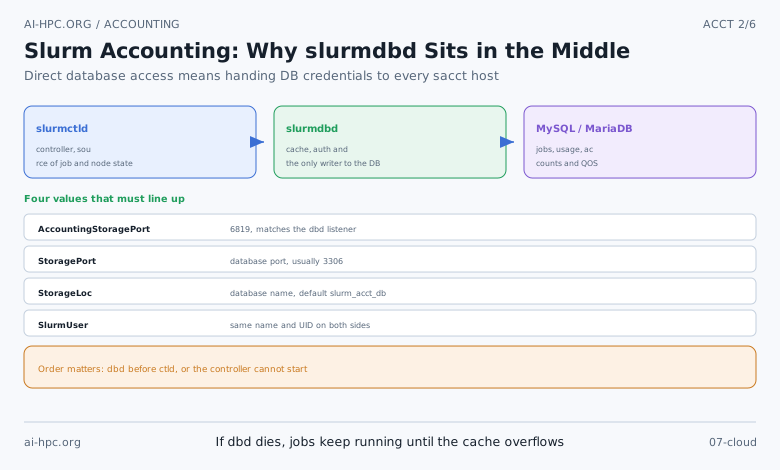
2. Three tiers: slurmctld → slurmdbd → database
The official architecture sends accounting records from the controller to slurmdbd (Slurm Database Daemon), which writes them into MySQL or MariaDB. Why not let slurmctld talk to the database directly? The documentation states the reason plainly: direct access requires distributing database credentials to every host that runs sacct, sreport or sacctmgr, and ordinary users run sreport, so the database security boundary disappears. slurmdbd also caches records, which reduces database pressure.
Values that must match:
| Parameter | File | Default / requirement |
|---|---|---|
AccountingStoragePort | slurm.conf | Must equal the slurmdbd listening port, default 6819 |
StoragePort | slurmdbd.conf | Database port, usually 3306 |
StorageLoc | slurmdbd.conf | Database name, default slurm_acct_db |
StorageType | slurmdbd.conf | Only valid value today: accounting_storage/mysql |
SlurmUser | both | Same name and UID on both sides; if not root, this user needs AdminLevel=Admin |
Authentication uses MUNGE. A single-cluster deployment can reuse the existing MUNGE setup. When several clusters report into one slurmdbd, every node needs MUNGE and user names must agree: accounting is keyed by user name, authentication by UID, and both must be consistent across clusters.
Two operational facts worth knowing up front:
- A dead slurmdbd does not stop jobs.
slurmctldbuffers accounting records internally and flushes them when slurmdbd returns. The queue has a limit, so a long outage starts dropping records. - Startup order is a hard constraint. The first
slurmctldstart requires slurmdbd to be reachable, because accounts and limits are loaded from the database. Plan boot order and monitoring around "dbd before ctld".
3. Database: the settings that can break slurmdbd
The documentation recommends a small set of values, and three of them are in the "get it wrong and it breaks" category:
| Parameter | Recommended | Consequence if unset |
|---|---|---|
innodb_buffer_pool_size | 5–50% of RAM, at least 4 GiB | Purging and upgrades become very slow as the database grows |
innodb_lock_wait_timeout | 900 seconds | Long queries get killed |
max_allowed_packet | at least 16M | Writes fail when AccountingStoreFlags=job_env,job_script is enabled |
innodb_snapshot_isolation | OFF (MariaDB) | MariaDB 11.6.2+ defaults to ON; a row conflict makes slurmdbd unrecoverable and it exits |
The last row is the most common cause of "slurmdbd keeps restarting after a fresh MariaDB install" and belongs in every install checklist. On MySQL 8.0.30+ use innodb_redo_log_capacity instead of innodb_log_file_size, set to 25% of the buffer pool.
4. The switches in slurm.conf and the enforce options
# slurm.conf (excerpt)
ClusterName=ai-hpc
AccountingStorageType=accounting_storage/slurmdbd
AccountingStorageHost=dbd-master
AccountingStoragePort=6819
AccountingStorageEnforce=associations,limits,qos
TrackWCKey=yes
PriorityType=priority/multifactor
AccountingStorageEnforce takes a comma-separated list:
| Value | Effect | Implies |
|---|---|---|
associations | Users without an association in the database cannot run jobs | — |
limits | Enforces association and QOS limits | associations |
qos | Every job must resolve to a valid QOS | associations |
safe | A job starts only if it can finish within remaining quota, so it is never killed mid-run by a limit | associations, limits |
wckeys | Users may only use their own wckey, and TrackWCKey is set | associations |
nojobs / nosteps | Skip job or step detail, keeping only limit enforcement | each other |
Practical advice: enable associations,limits,qos together. With only limits, QOS admission is not checked; with only qos, limits are not enforced. All three together give you "no account, no submission", "over quota, queued", and "invalid QOS, rejected".
Do not restart only slurmdbd after editing slurm.conf. Controller-side parameters need scontrol reconfigure or a slurmctld restart.
5. Building the tree: cluster → account → user, in that order
The documentation is explicit: define clusters first, then accounts, then users.
# 1) Register the cluster (since 20.02 slurmctld adds it on start, but associations are still manual)
sacctmgr add cluster ai-hpc

# 2) Accounts, hierarchical via parent=
sacctmgr add account root  Description="root"  Organization=lab
sacctmgr add account llm,ai4s parent=root Description="two groups" Organization=lab

# 3) Users, with a default account
sacctmgr add user zhang DefaultAccount=llm
sacctmgr add user li    Account=ai4s

# 4) Inspect
sacctmgr show assoc format=cluster,account,user,partition,qos%20,grptres%30
The tree is not cosmetic. Grp* limits aggregate up the tree: a parent account's GrpTRES covers itself plus all children, and fairshare shares are also distributed over the tree. Design the tree to match the real organisation. Renaming or re-parenting later leaves historical usage attributed to the old lineage, so sreport filtered by the new account misses that history — an easy trap when reading reports.
6. Two levels of quota: association and QOS
Limits can live in three places: an association (the cluster/account/user/partition tuple), a QOS, and a partition. QOS limits override association limits, and partition limits act as an upper bound.
Common association and QOS limit fields:
| Field | Meaning |
|---|---|
GrpTRES | Total resources the group may hold at once, e.g. cpu=64,gres/gpu=8 |
GrpTRESMins | Cumulative TRES-minute budget; on exhaustion running jobs are killed and new jobs are refused |
GrpTRESRunMins | Total TRES-minutes of running jobs, charged against their requested time |
GrpWall | Cumulative wall-clock budget |
GrpJobs / GrpSubmitJobs | Concurrent running jobs / jobs on record |
MaxTRESPerUser / MaxTRESPerJob | Per-user and per-job resource caps |
MaxWallDurationPerJob | Per-job time limit |
MaxTRESMinsPerJob | Per-job TRES-minute cap |
A frequent misconception is that setting GrpTRES in the database is enough to block jobs. It is not: without AccountingStorageEnforce=limits, limits are only data.
The documented precedence for limit enforcement:
- Partition QOS
- Job QOS
- User association
- Account associations, ascending the hierarchy
- Root/cluster association
- Partition limits
- None
Three exceptions matter. Max[Time|Wall] and [Min|Max]Nodes can never exceed the partition-level limit unless the QOS sets PartitionTimeLimit or Partition[Max|Min]Nodes. Grp* limits take the stricter of the definitions, so a tight parent account cannot be loosened at a child. And where several limits are defined at the same level, the first one encountered in the list wins rather than the minimum.
Three QOS flags are especially useful:
Flags=DenyOnLimitrejects a job at submission when it violates a limit on its own (by default it merely queues).Flags=NoDecaystopsGrpTRESMinsandGrpWallfrom decaying, turning them into a one-shot hard quota — suitable for prepaid GPU-hour bundles.UsageFactor/UsageThresholdmultiply billed usage (2 means double billing), or hold jobs once fairshare drops below a threshold.
A four-tier QOS example you can adapt:
sacctmgr add qos debug
sacctmgr modify qos debug set MaxWallDurationPerJob=00:30:00 MaxTRESPerUser=gres/gpu=2 Priority=100

sacctmgr add qos normal
sacctmgr modify qos normal set GrpTRES=cpu=512,gres/gpu=64 MaxWallDurationPerJob=24:00:00

sacctmgr add qos long
sacctmgr modify qos long set MaxWallDurationPerJob=7-00:00:00 GrpTRESMins=cpu=1000000 Priority=-10

sacctmgr add qos urgent
sacctmgr modify qos urgent set Priority=1000 Preempt=long
# Preemption of long by urgent also needs PreemptType=preempt/qos in slurm.conf
Note that Priority only participates when PriorityWeightQOS > 0, and Preempt only when PreemptType=preempt/qos. Both are common "configured but inactive" cases.
7. Fairshare: what the ledger actually computes
The fairshare factor is the difference between the promised share and the resources already consumed, on a 0.0–1.0 scale, where higher means scheduled sooner. Three decisions determine whether it is trustworthy on your cluster.
First, the unit of measure. By default usage is accounted in cpu-seconds, so GPUs and memory are invisible. A GPU cluster must set TRESBillingWeights, otherwise one A100 costs the same as one CPU core. The documented method sums each TRES quantity multiplied by its weight. With TRESBillingWeights=CPU=1.0,Mem=0.25G:
| Job | Requested | Billing units |
|---|---|---|
| Job1 | 1 CPU + 60 GiB | 1×1.0 + 60×0.25 = 16 |
| Job2 | 16 CPU + 1 GiB | 16×1.0 + 1×0.25 = 16.25 |
| Job3 | 16 CPU + 60 GiB | 16×1.0 + 60×0.25 = 31 |
An alternative accounting takes the max of the per-node TRES values (PriorityFlags=MAX_TRES), which suits users who reserve a whole node but use one core, so they are not billed for the entire machine. Pick deliberately: once the billing rule is live, users optimise against it.
Second, algorithm and half-life. Since 19.05 the default is the Fair Tree algorithm, which orders siblings in the account tree by share; only PriorityFlags=NO_FAIR_TREE reverts to the classic algorithm. Historical usage decays under PriorityDecayHalfLife, default 7-0 (7 days). Recalculation happens every PriorityCalcPeriod, default 5 minutes, and the age factor saturates at PriorityMaxAge, also 7 days by default.
A 7-day half-life means a heavy three-day run last week largely fades within two weeks. For quarterly quotas, lengthen the half-life (for example 14-0 or more) and set PriorityUsageResetPeriod to MONTHLY or QUARTERLY so budgets reset per period. If you want a hard "use it or lose it" budget, set PriorityDecayHalfLife=0 together with PriorityUsageResetPeriod; without reset, a zero half-life plus nothing else produces a fixed ceiling that never clears.
Third, weights. All nine factor weights default to 0, so writing PriorityType=priority/multifactor alone still behaves like FIFO. A common configuration makes fairshare dominant:
PriorityWeightFairshare=10000
PriorityWeightAge=1000
PriorityWeightJobSize=1000
PriorityWeightPartition=1000
PriorityWeightQOS=0
The documentation warns against small weights: factors are decimals between 0.0 and 1.0, two jobs may differ by 0.0001 in fairshare, and a weight of 10 rounds that difference away. To resolve differences around 0.001, use weights on the order of 1000.
Three commands for inspection: sshare -l (RawUsage, EffectvUsage, FairShare, LevelFS), sprio -w (weights and per-job breakdown), and squeue --format="%.18i %.9P %.8j %.8u %.2t %.10M %.6D %Q" for priority.
8. Reporting and data retention
sreport reads the hourly, daily and monthly rollup tables in the database. The wider the requested range, the more likely it hits the monthly rollup, which is why "last quarter by group" returns in seconds.
# Usage by user across the account tree
sreport cluster AccountUtilizationByUser start=2026-11-01 end=2026-11-30 tree

# Top users by CPU time
sreport user topusage start=2026-11-01 end=2026-11-30 TopCount=20

# Cluster utilisation: allocated, idle, down
sreport cluster utilization start=2026-11-01 end=2026-11-30
Every sreport call sends an RPC to slurmdbd, and the documentation explicitly warns against calling it in shell loops, which can degrade the daemon to denial of service. For dashboards, poll once on a schedule, store the result, and render from storage.
Decide retention at rollout, not after the database reaches tens of gigabytes. PurgeJobsAfter has a subtle unit difference:
PurgeJobsAfter=12monthspurges records older than 12 months at the start of each month;PurgeJobsAfter=365dayspurges records older than 365 days every day.
Retention is similar but the purge cadence is very different; busy clusters should use days to spread the work. If history must be kept, use the Archive feature to write purged data to flat files and load it into a separate archive slurmdbd, copying only the association, QOS and TRES tables with mysqldump so identifiers line up.
9. Rollout order and acceptance checklist
- Install
slurmandslurm-slurmdbd, create the database, and apply the settings from section 3. - Write
slurmdbd.conf, start slurmdbd, confirmsystemctl status slurmdbdand that port 6819 is listening. - Enable
AccountingStorageType/Host/PortandAccountingStorageEnforce=associations,limits,qosinslurm.conf, thenscontrol reconfigure. - Create the cluster, account tree and users with
sacctmgr. - Create QOSs and attach them to associations (
sacctmgr modify user xx set qos=debug,normal). - Enable
PriorityType=priority/multifactor, the weights, andTRESBillingWeights. - Accept five checks:
| Check | Expected result |
|---|---|
A user without an association runs sbatch | Rejected, message says the association is missing |
Submit beyond MaxTRESPerUser | Queued, and squeue shows a limit reason code such as QOSMaxTRESPerUser |
Exceed GrpTRESMins | Running jobs killed at exhaustion, new jobs refused (reason like QOSGrpTRESMinutesLimit) |
sshare -l | LevelFS drops for persistent heavy users |
sreport cluster AccountUtilizationByUser | Aggregates usage along the account tree |
10. Known pitfalls
- Limits without enforce: nothing is blocked, and the database is only a report store.
qosin enforce but no default QOS: every submission is rejected. Set a default QOS on the account or user first.- Edited enforce without
scontrol reconfigure: the new flags never take effect. slurmctldstarted beforeslurmdbd: the first start fails and the controller restart-loops.- Switching from the mysql plugin to slurmdbd: the cluster must already exist via
sacctmgr add cluster, otherwise the controller cannot reach dbd. - Typed GRES limits silently ignored:
MaxTRESPerUser=gres/gpu:tesla=1does not stop--gres=gpu:2. Either force typed requests with a job_submit Lua plugin or record bothgres/gpuandgres/gpu:teslainAccountingStorageTRES. - Newer MariaDB defaults
innodb_snapshot_isolation=ON: slurmdbd exits on a row conflict, so it must be turned off at install time. - Fairshare weights without
TRESBillingWeights: on a GPU cluster, usage is billed in CPU-seconds and fairness is illusory.
The point of accounting is not the report. It turns resource allocation from first-come-first-served into something explainable, appealable and budgetable. Once quotas and fairshare go live, submission behaviour changes, so settle the rules before rollout rather than in flight — every change of accounting basis splits your history into two incompatible ledgers.