Object Storage Is Not a Disk: S3 Semantics, the Cost of Mounting, and Data-Lake Integration
A 50 TB training dataset sits in object storage. The training host mounts the bucket as a directory through FUSE, and the DataLoader open()s one sample at a time. Throughput lands at a few tens of MB/s, the NIC is nowhere near saturated, and the CPU spends most of its time in system calls. More bandwidth does not help, and neither does a faster machine — the bottleneck is not moving bytes, it is asking for metadata once per file, and every ask is a network round trip to an object store.
This is not a flaw in the mounting tool. It is that object storage semantics are not filesystem semantics. This article puts the boundary on the table: what S3 actually promises, which operations break when you treat a bucket as a disk, how to size transfer parameters from object size, and how checkpoints and data lakes should connect.
1. What S3 promises: single-key atomicity, no cross-key transactions
Pin down the guarantees first; every trap later follows from this table:
| Capability | Documented statement | Engineering meaning |
|---|---|---|
| PUT/DELETE consistency | Strong read-after-write consistency in all Regions, covering new objects, overwrites and deletes | "Read right after write" works; no sleep needed |
| Single-key update | Updates to one key are atomic: a concurrent GET returns either old or new data, never partial or corrupt bytes | Replacing one object is safe |
| Cross-key operations | Explicitly: "There is no way to make atomic updates across keys" | No directory-level transaction; multi-object commits are not atomic |
| Concurrent writes to one key | No object locking; last timestamp wins | Multiple writers must design locking/idempotency |
| Bucket configuration | Eventually consistent: a deleted bucket may still list; after first enabling versioning, wait 15 minutes before writing | Automation needs slack |
| Primitive set | No rename, no append, no directories | The "atomic rename to commit" pattern does not exist here |
In one sentence: S3 is a key → immutable byte-blob KV store, not a namespace. The common training-engineering habit — write x.tmp, then mv it to x so the file is either complete or absent — becomes "copy one object and delete another" on object storage.
2. Four operations that look fine and fail in practice
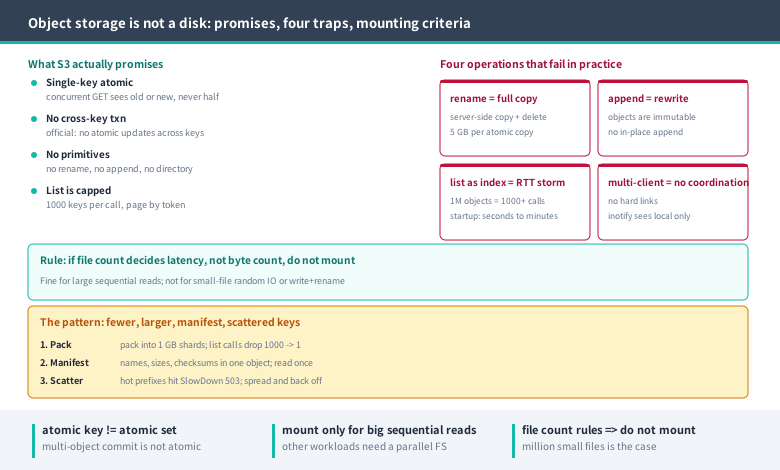
2.1 rename: one rename equals one full copy
S3 has no rename API; a rename is a server-side copy plus a delete. The documented CopyObject limit is explicit: a single atomic copy covers objects up to 5 GB, and anything larger must use UploadPartCopy. Consequently:
- Renaming a 10 GB checkpoint is a 10 GB server-side read and write (no client bandwidth, but time and request costs are still billed);
- "Rename the whole directory to
latest/" means one copy per object under it; - During the copy the source and destination coexist, so capacity counts double.
2.2 append: the whole object is rewritten
Appending to a log, or incrementally adding shards to one checkpoint file, requires rewriting the entire object. This is not laziness in the implementation — objects are immutable byte blobs with no in-place append semantics. The s3fs project's own documentation lists this as a limitation: random writes and appends "require rewriting the entire object, optimized with multi-part upload copy".
2.3 list as an index: at most 1000 keys per call
ListObjectsV2 returns at most 1000 keys per response (the default is up to 1000, and the response may contain fewer); paging requires NextContinuationToken. That means:
- A million sample files needs at least 1000 list requests to enumerate, each a network round trip;
- "List the directory to see what's there" is an in-memory operation on a filesystem and a distributed request here;
- The habit of "scan the dataset at startup to build an index" turns seconds of startup into minutes.
2.4 Many clients mounting one bucket: no coordination
Three more s3fs limitations bear directly on training: no coordination between multiple clients mounting the same bucket, no hard links, and inotify only sees local modifications. Sharing one mount read-write across nodes means each node maintains its own metadata cache, and what they see can diverge. A shared workspace fundamentally wants a parallel file system, not object storage.
3. The cost ledger of mounting
FUSE mounts (s3fs, goofys, and similar) are not unusable; they are narrowly applicable. Go through workloads by type:
| Workload | Mount suitable? | Why |
|---|---|---|
| Large-file sequential read (dataset distribution) | Yes | Close to one streaming GET; FUSE overhead is small relative to bytes |
| Massive small-file random reads | No | One metadata request plus one GET per file; RTT dominates |
| Frequent writes plus rename-to-commit | No | No atomic rename, write amplification, commit semantics break |
| Multi-host shared read-write workspace | No | No coordination between clients; cache divergence |
| Resumable/seek reads of large objects | Marginal | Depends on Range requests and local cache; measure first-byte latency |
| Hot checkpoint writes | No | Long write path, no append, no atomic commit |
A practical test: if file count, rather than byte count, determines your elapsed time, do not mount it. Training datasets with millions of small files are exactly that case.
4. Correct pattern one: whole-object sequential IO plus packing
Object stores like few, large objects. Convert the dataset from "millions of small files" to "thousands of shards" and nearly all the problems disappear together:
- Pack: bundle N samples into tar or shard formats (say 1 GB per shard) so one shard is one sequential GET. List calls drop from "1000 pages of 1000 keys" to "1"; object requests drop from "one per sample" to "one per shard".
- Manifest instead of listing: the trainer does not scan the bucket; it reads a manifest (JSON/Parquet) recording shard names, sizes, checksums and sample counts. The manifest is itself one object, read once, and it sidesteps pagination and prefix scanning entirely.
- Prefix design: high-concurrency requests concentrated on one prefix get throttled; the documented error is
SlowDown(HTTP 503, "Please reduce your request rate"). Do not use a pure incrementing sequence as the shard prefix; spread by time or batch, and have clients back off on 503 rather than raise concurrency.
5. Correct pattern two: size transfer parameters from object size
The AWS CLI s3 command family has six parameters that directly affect throughput, with these defaults (from the official CLI documentation, not rules of thumb):
| Parameter | Default | Purpose |
|---|---|---|
max_concurrent_requests | 10 | Requests in flight |
max_queue_size | 1000 | Task queue ceiling |
multipart_threshold | 8MB | Size above which transfers go multipart |
multipart_chunksize | 8MB (5MB minimum for uploads) | Part size |
max_bandwidth | unlimited | Rate limiting; not applied to copy/delete |
io_chunksize | 256KB | In-memory chunk size for downloads |
What matters is part-count arithmetic, not just raising concurrency. S3's multipart limits are 10,000 parts, 5 MiB–5 GiB per part, 48.8 TiB maximum object size:
- With the default 8 MB part size, any object above 80 GB (80,000 MB ÷ 8 MB = 10,000) hits the part ceiling; the CLI adjusts automatically, but the adjusted value may not be what you want;
- A 1 TB object using all 10,000 parts needs parts of at least about 105 MB;
- The 48.8 TiB ceiling is the same order as "10,000 × 5 GiB".
So derive parameters from object size: for large objects compute part ≥ object_size/10000 first, then set multipart_chunksize; estimate concurrency as "NIC bandwidth ÷ throughput per request", and in practice raising 10 to 32–64 is often enough (this is a rule of thumb — measure, do not copy).
6. Integrity: an ETag is not a content fingerprint
Using ETags for deduplication or integrity checks is one of the most common object-storage mistakes. The documentation is explicit: whether an ETag is an MD5 depends on how the object was created and encrypted:
| Creation path | ETag is MD5? |
|---|---|
| PUT/POST/Copy + plaintext or SSE-S3 | Yes |
| PUT/POST/Copy + SSE-C or SSE-KMS | No |
| Multipart Upload or Part Copy | Never (regardless of encryption) |
| Console upload/copy >16 MB | No (the console switches to multipart) |
The right approach is S3's checksum mechanism: supported algorithms include CRC64NVME (the current default), CRC32, CRC32C, SHA-1, SHA-256, MD5, XXHASH64/3/128 and SHA-512. AWS-owned clients compute a checksum and send it with the request; S3 independently computes one server-side and validates before storing. A more robust engineering pattern: compute your own SHA-256 and record it in the manifest, then verify after download. Do not rely on ETag.
7. Checkpoints: keep the hot path off object storage
Writing checkpoints straight into object storage (even via a mount) is awkward in three places at once:
- Write shape mismatch: sharded saves such as DCP produce "one file per write request plus a
.metadata", which on object storage is hundreds of PUTs with no atomic rename to serve as a commit; - No clear success criterion: on a filesystem, a returned
fsyncmeans durable; on object storage you must wait for the PUT to return and the checksum to pass; - Slow recovery: many hosts reading one checkpoint amplify first-byte latency and request throttling, stretching recovery time.
The pragmatic layering: write hot checkpoints to local NVMe or the parallel file system, then upload asynchronously to object storage for archival. Update the "latest usable checkpoint" pointer (a tiny manifest object) only after the upload completes; on recovery, read the pointer first and then pull the archive. DCP's async_save with its two futures (staging done / upload done) maps exactly onto this split — see Distributed Checkpointing in Practice; capacity and watermark details are in Capacity and Quota Operations.
8. Data-lake integration: metadata belongs in a catalog, not in list calls
The point of a data lake is not "dump files into a bucket" but "let the query engine locate data without scanning objects":
- Columnar formats plus partition prefixes: organize Parquet/ORC by partitions such as
dt=2026-11-20/hour=03/so queries prune whole prefixes; keep individual files in the tens-to-hundreds-of-MB range (follow the engine's own guidance) to avoid millions of tiny objects. - Table-format metadata: Iceberg/Delta-style formats record file lists, statistics and snapshots in a metadata layer, so engines read metadata instead of calling
ListObjects. There is an official S3 form too — S3 Tables is a bucket type purpose-built for tabular data in Apache Iceberg format. - Catalog instead of listing: trainers should follow the same principle — a manifest or index object acts as the data catalog, and the bucket stays a byte warehouse.
9. Interface by purpose: a landing table
| Purpose | Object layout | Transfer | Integrity |
|---|---|---|---|
| Raw dataset archive | GB-scale shards + manifest | aws s3 cp/sync; parts ≥ object/10000 | Self-computed SHA-256 in manifest |
| Training data distribution | Shards mounted read-only, or prefetched to local NVMe | Large sequential reads; avoid per-sample open | Sampled verification at startup |
| Hot checkpoint | Local/PFS | Native framework writes | fsync plus size check |
| Checkpoint archive | Step prefix + pointer object | Async upload, flip pointer after completion | HEAD plus checksum after upload |
| Model distribution | One large object + version prefix | Concurrent GETs across hosts | SHA-256 |
| Logs/metrics | New object per time slice | Batch small objects before upload | Row count plus checksum |
10. Landing checklist and acceptance criteria
Whether the migration worked is judged by five numbers, not by feel:
- List request count: from startup to first batch, bucket-side
ListObjectscalls should be constant (1–2 for the manifest), not "file count/1000". - Object requests per sample: should be far below 1 (one per shard, amortized near zero), not one per sample.
- Sequential read bandwidth: a single-stream large GET should approach the usable share of link bandwidth; if it is tens of MB/s, check for small objects or small Ranges first.
- Commit mechanism: confirm no code assumes "write a temp object then rename"; switch to "write a new key and update the pointer".
- Checksum agreement: SHA-256 in the manifest matches local computation after download; ETag plays no part.
A minimal distribution script (tune parameters to object size, do not copy the concurrency):
# 1) Pack into GB-scale shards (one object per shard)
tar -cf dataset-v3-0000.tar -T shard-0000.list

# 2) Upload shard by shard; for large objects set part size >= object_size/10000
aws s3 cp dataset-v3-0000.tar s3://bucket/dataset/v3/dataset-v3-0000.tar

# 3) Confirm stored size with HEAD (never use ETag as a checksum)
aws s3api head-object --bucket bucket --key dataset/v3/dataset-v3-0000.tar

# Override defaults in ~/.aws/config as needed
# [profile bulk]
# s3 =
#   max_concurrent_requests = 32
#   multipart_threshold = 64MB
#   multipart_chunksize = 128MB
11. Six common traps
- Treating ETag as an MD5 for dedup: multipart and SSE-KMS ETags are not content MD5 at all;
- Treating
mvas an atomic commit: rename on S3 is copy plus delete; renaming a 10 GB object copies 10 GB; - Using list as a dataset index: a million objects means a thousand paged requests, slow startup and easy 503 throttling;
- Sharing one mount as a workspace across hosts: no coordination between clients, cache divergence;
- Writing checkpoints straight to the bucket: long write path, no atomic commit, first-byte latency stacked on recovery;
- Not computing part count from part size: the 8 MB default hits the 10,000-part ceiling for objects above 80 GB.
The correct use of object storage fits in one sentence: treat it as a warehouse of whole byte blobs addressed by key, and manage metadata yourself via manifests or table formats. If you want directories, atomic renames, or multi-host shared writes — that is a parallel file system's job; the division of labor is covered in Training Data Storage Selection.