Slurm Heterogeneous Scheduling: Resource Management for CPU/GPU Mixed Clusters
Abstract: Real clusters are almost always heterogeneous — GPU nodes for training, CPU nodes for pre/post-processing and scientific simulation, possibly fat high-memory nodes. Whether Slurm manages heterogeneous resources well directly determines cluster utilization. This article covers gres configuration, partition design, job submission, and scheduling strategy in practice.
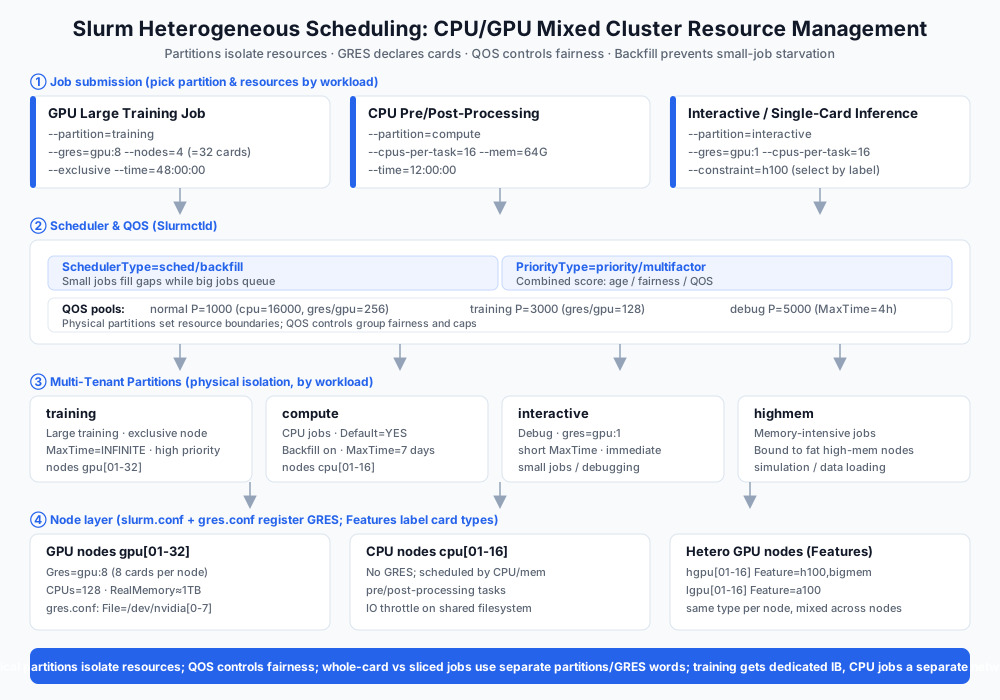
1. Three Shapes of Heterogeneous Clusters
Form A: GPU nodes + CPU nodes (most common)
Form B: CPU/GPU on the same node (inference / GPU-accelerated scientific computing)
Form C: Heterogeneous GPU mix (training cards + inference cards in one cluster)
Each shape needs a different strategy: Form A by partition isolation, Form B by fine-grained gres allocation, Form C by labels and backfill.
2. Base Configuration: Making Slurm Aware of GPUs
2.1 Declaring GPU Nodes in slurm.conf
# Node declaration (GPU nodes)
NodeName=gpu[01-32] Gres=gpu:8 CPUs=128 RealMemory=1000000 Sockets=2 CoresPerSocket=64 ThreadsPerCore=1

# Partitions
PartitionName=training Nodes=gpu[01-32] Default=NO MaxTime=INFINITE State=UP
PartitionName=compute   Nodes=cpu[01-16] Default=YES MaxTime=7-00:00:00 State=UP

# Max concurrent jobs per node (GPU partition bounded by cards)
MaxNodes=32
2.2 gres.conf (GPU Resource Abstraction)
# gres.conf — 8 cards per node
NodeName=gpu[01-32] Name=gpu File=/dev/nvidia[0-7]
WARNING
Gres=gpu:8declares cards per node; jobs request on demand with--gres=gpu:N. A mismatch leaves jobs stuck in PENDING (Resources).
2.3 Verification
sinfo -o "%P %N %G %t"       # partition/node/gres type/state
scontrol show node gpu01     # per-node details (Gres field)
3. Job Submission: Templates for Training and CPU Jobs
3.1 GPU Training Job
#!/bin/bash
#SBATCH --partition=training
#SBATCH --gres=gpu:8          # full node, 8 cards (TP=8 as base)
#SBATCH --nodes=4             # 4 nodes = 32 cards
#SBATCH --ntasks-per-node=8
#SBATCH --exclusive           # exclusive node, avoid interference
#SBATCH --time=48:00:00

srun --mpi=pmix bash -c "torchrun --nnodes=4 --nproc-per-node=8 train.py"
3.2 CPU Pre/Post-Processing Job
#!/bin/bash
#SBATCH --partition=compute
#SBATCH --cpus-per-task=16
#SBATCH --mem=64G
#SBATCH --time=12:00:00

python preprocess.py --input $SLURM_ARRAY_TASK_ID
3.3 CPU/GPU Co-location on One Node (inference)
#SBATCH --partition=compute
#SBATCH --gres=gpu:1          # single-card inference + many CPU cores
#SBATCH --cpus-per-task=16
4. Partitions and QOS: Keeping Heterogeneous Resources from Fighting
4.1 Partition Strategy
| Partition | Purpose | Key parameters |
|---|---|---|
| training | Large training jobs | --exclusive, long MaxTime, high priority |
| compute | CPU jobs | Backfill enabled |
| interactive | Interactive debugging | --gres=gpu:1, short MaxTime, immediate allocation |
| highmem | Memory-intensive | Bound to fat nodes |
4.2 QOS Fairness Design
# qos.conf
Name=normal   GrpTRES=cpu=16000,gres/gpu=256  Priority=1000
Name=training GrpTRES=gres/gpu=128            Priority=3000
Name=debug    MaxTime=04:00:00                 Priority=5000

# Key scheduling params (slurm.conf)
SchedulerType=sched/backfill     # backfill: small jobs fill large-job gaps
PriorityType=priority/multifactor # multi-factor priority (age/fairness/QOS)
Core principle: physical partitions isolate resources; QOS controls fairness; backfill keeps small jobs from starving while large jobs queue.
5. Advanced Strategies for Mixed Clusters
5.1 Features for Heterogeneous GPU Classification
# slurm.conf — classify card types with Features
NodeName=hgpu[01-16] Gres=gpu:8 Feature=h100,bigmem
NodeName=lgpu[01-16] Gres=gpu:8 Feature=a100

# Jobs select on demand
#SBATCH --gres=gpu:8 --constraint=h100
5.2 Heterogeneous Driver Pitfalls
- Never mix different GPU generations on one node: the driver is system-level; H100+A100 on one node needs a driver supporting both (usually backward-compatible), but SXM Fabric Manager only matches its own generation.
- Mix by node, not within a node: same type per node, heterogeneous across nodes — simplest for scheduling and troubleshooting.
5.3 Storage and Network for Mixed Loads
- When GPU training and CPU jobs share the filesystem, IO priority isolation (QOS
GrpTRES=cpu+ filesystem-side throttling) prevents pre-processing from hammering training reads. - The training partition gets dedicated IB bandwidth (RoCE/IB QoS policy); CPU jobs use a separate network priority.
6. Common Pitfalls Quick Reference
| Pit | Symptom | Fix |
|---|---|---|
| gres declaration error | Jobs PENDING forever | Verify Gres=gpu:N vs gres.conf consistency |
| Backfill not enabled | Small jobs queue long | Enable sched/backfill |
| GPU memory not isolated | Co-located jobs OOM each other | MIG or --gres=gpu:1 --exclusive |
| Fabric Manager missing | SXM node NVLink fails to come up | Driver version strictly matches FM |
| Mixed-generation driver conflict | Jobs fail on some nodes | Same type per node; heterogeneous across nodes |
| Missing priority config | Large jobs starve small jobs | QOS multi-factor priority + age decay |
7. Checklist
- [ ] slurm.conf/gres.conf node declarations match physical config
- [ ] Partitions by load (training/compute/interactive/highmem)
- [ ] QOS fairness configured (backfill + multi-factor priority)
- [ ] GPU jobs use
--exclusiveor a defined memory-isolation strategy - [ ] Heterogeneous GPUs classified with Features; jobs select on demand
- [ ] SXM node FM version matches driver
- [ ] Mixed-load IO/network priority isolation
Further reading: GPU Drivers & Lifecycle Management (heterogeneous driver-stack ops), Distributed Parallelism Overview (how GPU jobs parallelize).