MDS in Practice: Metadata Bottlenecks, DNE Directory Sharding and the Recovery Window
This site already covers Lustre deployment, client I/O tuning, inode quota and data integrity, but the metadata service has only ever been mentioned in passing. The result is predictable: a user reports "storage is stuck", the on-call engineer runs df on a client, then suspects a switch, and finally reboots the MDS — three actions, none of them aimed at the actual problem.
This article treats the MDS as a layer of its own: how to pin a fault to a position with five readings, how metadata rates should actually be read, how DNE spreads directories across MDTs, and what a restarting MDS is really waiting for. Every command and threshold below comes from the Lustre manual, the official man pages or kernel-side parameter documentation; details that could not be verified are simply left out.
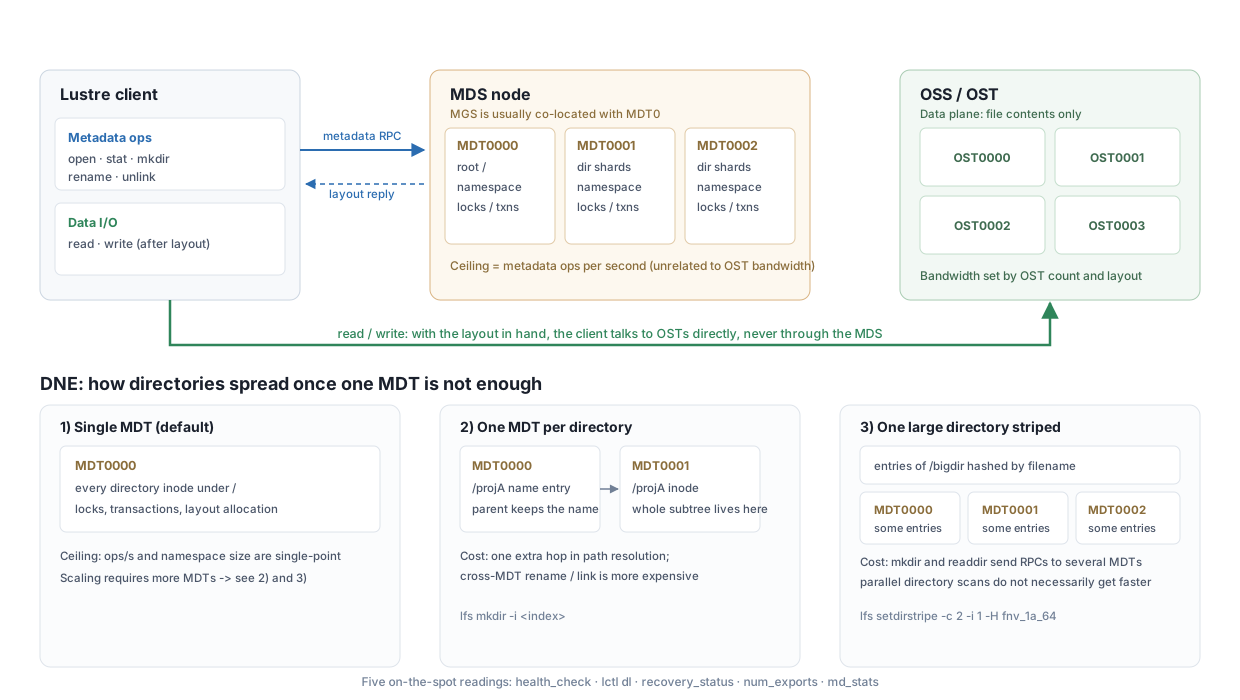
1. The metadata plane is its own layer, not "part of the storage"
An open and a read take different paths:
open/stat/mkdir/renamego to the MDT on the MDS, which looks up the namespace and permissions and returns the file layout;- once the layout is in hand,
read/writeare issued by the client directly to the OSTs and never touch the MDS again.
Two consequences follow at the same time:
- Metadata capability is bounded by the MDT's ops/s and has nothing to do with data-plane bandwidth. A file system that streams 100 GB/s will still take ten minutes to
ls -la directory with a million files if the MDT can only handle a few thousandgetattrper second. - The MDT is a prerequisite for reaching any file. The Lustre manual says so directly in its backup chapter: because the MDT is required for access to all files, losing it forces a full restore of the file system — even when every OST is intact. That is why device-level MDT backups are more valuable than OST backups.
The MGS (management service) is usually co-located with MDT0 (the deployment guide's mkfs.lustre --mgs --mdt --index=0 produces exactly that shape), and MDT0 also hosts the file system root /. That matters for the DNE section below.
2. Three-layer triage: decide which layer first, then what to read
Metadata faults look almost identical from the outside — every path-based operation hangs on the client — but the causes sit in three different layers, each with its own evidence:
| Layer | Typical symptom | What to read |
|---|---|---|
| Client | Only a few nodes hang, others are fine; df also stalls | Client-side lctl get_param health_check, Evicted client in dmesg |
| Lock (LDLM) | Specific directories or files stall, other paths are normal | Whether lctl get_param ldlm.namespaces.*.lock_count only ever grows |
| Server | Every client stalls at once; num_exports drops or hits zero | health_check, lctl dl, lfs check mdts, mdt.*.md_stats |
A useful rule: "all clients stalled at once" is almost always the server or the network, not the clients. Client-side problems usually show up as "some nodes misbehaving", because each of them holds its own locks and hits its own timeouts.
3. Three cheap first readings on the server
Do not start by grepping dmesg in the first minute of a hang — high volume, high noise. Look at three cheap readings first:
# 1) Node-level health bit: every Lustre node (client, OSS, MDS) exposes it
lctl get_param health_check

# 2) The Lustre device tree and its state on this node
lctl dl

# 3) Actively probe every MDT with an RPC (not a cached read)
lfs check mdts
health_check has only a few possible values: healthy when the node is fine, otherwise a form carrying the reason, such as NOT HEALTHY - LBUG (a kernel assertion) or NOT HEALTHY - dead import (the import to some peer is dead). Those two point at completely different responses: the first needs kernel logs and a check on patch state, the second needs LNet and the peer node.
The difference between lfs check mdts and lfs mdts is worth remembering: lfs mdts reads a client-side cache (seconds to tens of seconds stale), while lfs check really sends RPCs. Use the latter when troubleshooting, the former for dashboards.
4. How to read metadata rates: md_stats sampling semantics
mdt.*.md_stats holds per-operation counters accumulated on the MDT, in Lustre's standard stats format:
snapshot_time             1551297474.287642 secs.usecs
open                      1677848510 samples [reqs]
close                     1663771686 samples [reqs]
mkdir                     893715 samples [reqs]
rename                    14078053 samples [reqs]
getattr                   92881694 samples [reqs]
setattr                   69249178 samples [reqs]
statfs                    16118673 samples [reqs]
samedir_rename            14075412 samples [reqs]
crossdir_rename           2641 samples [reqs]
Three hard rules for reading it:
- These are cumulative counters, not rates. You must take two samples and subtract:
(N2 - N1) / (T2 - T1). Reading the absolute value only tells you how manyopens have been served since the last reboot. snapshot_timedefines the denominator. Use the twosnapshot_timevalues to compute the interval, not your script's wall clock — collection latency sits in between.samedir_renameandcrossdir_renameare counted separately.renameis one of the most expensive metadata operations (it takes locks on both the source and target directories), so it is split into same-directory and cross-directory classes. A high share of cross-directory renames usually means the workflow is constantly moving files around (for example relocating checkpoints between directories), and that load amplifies MDT pressure noticeably.
Per-client granularity lives in mdt.*MDT*.exports.*@*.stats: the exports subdirectory lists each client connection by NID, and the sum of the export stats should match md_stats. The use is direct — when md_stats shows getattr exploding, this tells you which node is doing the scanning.
For per-job attribution there is mdt.*.job_stats (jobstats), and since Lustre 2.16 the lljobstat tool filters the busiest jobs locally on the server. One easily missed default: statistics for a job are dropped after 600 seconds (10 minutes) of inactivity (job_cleanup_interval defaults to 600). So jobstats must be collected continuously; going back afterwards usually finds nothing.
5. Connections and evictions: num_exports is the fastest "did anyone drop" reading
lctl get_param mdt.*.num_exports
lctl get_param obdfilter.*.num_exports
num_exports is the current number of client connections to that target (other Lustre server nodes are counted too). Two criteria:
- A sudden drop: a batch of clients was evicted;
- Zero while the file system is still mounted: the target is probably offline or in recovery.
The three eviction reasons are visible directly in the server kernel log (dmesg | grep -i evict):
| Reason | Meaning |
|---|---|
CONN_EXPIRED | The client sent no ping within the timeout window |
RECONNECT_RACE | Conflicting reconnect attempts |
ADMIN_FORCED | An administrator evicted the client manually |
Client-side failure is detected by ping timeout, with a threshold proportional to obd_timeout (officially 1.5× that value). So when a whole batch of nodes is declared dead at once, the answer usually lies in a network interruption or load spike on the MDS side, not in the clients.
6. The recovery window: what a restarting MDS is waiting for
After a restart (or failover to a standby), the MDS does not serve immediately: it enters recovery, during which clients reconnect and replay metadata operations that were not yet committed before the restart, so the server can reconcile in-memory state with on-disk transactions.
Three mechanisms shape that window:
| Mechanism | Role | Parameters |
|---|---|---|
| Metadata replay | Every metadata operation carries a transaction number; the server tracks last_committed and clients replay everything after it | automatic |
| COS (Commit on Share) | When a modified object is shared (several clients hold locks on it), the MDS forces a commit, preventing cascading evictions during recovery | mdt.*.commit_on_sharing, enabled by default (1) |
| IR (Imperative Recovery) | A restarted target registers with the MGS, which proactively tells clients to reconnect instead of waiting for an RPC timeout | mgs.*.ir_factor (default 5), mgs.*.live.<fsname>, client mgc.*.ir_state |
The window length is bounded by two parameters: recovery_time_soft is the initial waiting window, recovery_time_hard the absolute ceiling (default 900 seconds). One discipline worth writing into the on-call runbook: do not memorize the soft default — different versions and different vendor manuals publish different values, so read the parameter on the box:
lctl get_param mdt.*.recovery_time_soft mdt.*.recovery_time_hardTo watch progress:
lctl get_param *.*.recovery_statusKey fields: status (RECOVERING / COMPLETE / INACTIVE), connected_clients and max_clients, and time_remaining. The interpretation is simple: if time_remaining keeps shrinking while connected_clients does not grow, some client is never coming back — stop waiting.
There is also a manual note that is routinely overlooked: the recovery process is blocked until all OSTs are available. So the prime suspect for an MDT stuck in RECOVERING is usually not the MDS itself but an OST that has not come up yet.
When to give up on recovery
If recovery is genuinely stuck, or the clients are known to be gone, you can force the target to skip recovery:
lctl dl                                  # get the device number first
lctl --device <N> abort_recovery         # or mount with -o abort_recov
The cost must be stated plainly: abort evicts every client and discards their uncommitted operations. It is not a synonym for "just restart it"; it means accepting the loss of some metadata operations. Use it only in the two cases above.
7. DNE: once one MDT is not enough, how directories get spread
A single MDT has a ceiling on ops/s and a ceiling on namespace size. DNE (Distributed Namespace Environment) answers with multiple MDTs sharing the namespace. There are three shapes in practice, with very different costs:
| Shape | How | Cost |
|---|---|---|
| Single MDT (default) | Every directory lives on MDT0 | Metadata throughput and file count are both single-point bound |
| One MDT per directory (remote dir) | The directory inode lives on another MDT; the parent only keeps the name entry | One extra hop in path resolution; cross-MDT rename/link semantics are more expensive |
| One large directory striped across MDTs | The directory's name entries are hashed by filename across several MDTs | Creating the directory and readdir send RPCs to multiple MDTs |
At the command level, lfs mkdir is an alias of lfs setdirstripe; semantics per the man page:
# Create a directory pinned to MDT index 2
lfs mkdir -i 2 /mnt/lustre/new_project

# Create a directory striped over 2 MDTs, master MDT 1, all_char hash
lfs setdirstripe -c 2 -i 1 -H all_char /mnt/lustre/bigdir

# Read back: master MDT index / number of MDTs / hash type
lfs getdirstripe -m -c -H /mnt/lustre/bigdir
Semantics you must remember:
-cis how many MDTs (--mdt-count),-iis the master/starting MDT (--mdt-index), and-1means the client chooses. With neither-cnor-i,lfs mkdirdefaults to-c 1 -i -1and creates the directory on the less-full MDT.- With
-i -1the choice is not plain round-robin: the client round-robins subdirectory creation while the MDTs' free space stays withinlod.*.mdt_qos_threshold_rrpercent of each other, and otherwise picks MDTs proportional to free space and inodes. -C(overstripe) is "stripes per MDT", a different knob from-c;-1means one stripe per MDT,-2…-5mean 2…5 per MDT, with a maximum multiplier of -5.- The hash function changes restripe cost:
fnv_1a_64is the default (reasonably uniform);crushis a consistent hash that relocates the fewest sub-files during a restripe;all_charis a weak hash, suitable only for testing or inputs already known to be uniformly distributed. lfs setdirstripeis root-only by default. Letting ordinary users create remote/striped directories requires changingmdt.*.enable_remote_dir_gid: the default0restricts it to root, a numeric GID restricts it to one group, and-1opens it to any user/group.
Inheritance: the rule pre-set on root
The file system root lives on MDT0000 and ships with a default directory layout:
lfs setdirstripe -D -i -1 -c 1 --max-inherit -1 --max-inherit-rr 3That means new directories are placed by space balance (-c 1 -i -1), and while the system is balanced the top three levels of new directories are created round-robin (--max-inherit-rr 3). --max-inherit controls how many levels this default layout is inherited down, capped at 250, with -1 meaning unlimited inheritance.
Two counter-intuitive points, stated plainly in the man page:
- You cannot switch it off with
lfs setdirstripe -d— a deleted layout is recreated automatically. Narrow it instead:-D -i -1 -c 1 --max-inherit 1 <mountpoint>limits it to one level, and-D -i 0 -c 1 --max-inherit 1 <mountpoint>disables balancing altogether. - Striping every directory across every MDT by default is officially not recommended. The reasoning given is that clients need more RPCs to create and access each directory, which hurts rather than helps. Striping belongs only in cases where a parent directory will spawn a large number of subdirectories (for example a job output directory per process); the normal pattern is
-c 1 -i -1on top-level directories, which spreadsmkdiracross MDTs without making every subdirectory remote.
Where striping stops paying off
-c helps concurrent access to a large directory, but it may not help parallel directory scans — an explicit trade-off in the official documentation. The practical order of judgement: look at which operation is rising in md_stats — rising getattr/statfs means someone is scanning, rising mkdir/create means files are being created, rising rename means files are being moved — and only then decide whether to add an MDT, stripe a specific directory, or change the workflow (pack small files, flatten the directory hierarchy).
One operational detail: when called without options, lfs getdirstripe lists layout information for all subdirectories under the given directory; pass -m / -c / -H explicitly to see only the directory itself. To remove the name entry of a remote directory without touching its inode, use lfs rm_entry.
8. A decision order for one misbehaving MDS
Chaining the readings above into an executable order beats "reboot first" every time:
- Health bit and device tree:
lctl get_param health_check,lctl dl. If it returnsNOT HEALTHY - LBUG, stop touching the service and capture kernel logs plus the vmcore configuration first. - Recovery state:
lctl get_param *.*.recovery_status. If it sits inRECOVERINGwithtime_remainingdecreasing and no clients joining, move on. - Check that all OSTs are up. Recovery is blocked by OSTs that have not come online, and this step frequently closes the case.
- Decide on abort: only when recovery is genuinely stuck or the clients are truly gone, and record explicitly that uncommitted operations were discarded.
- Verify three readings after recovery: is
num_exportsback at baseline, ismd_statsgrowing again across operations, is the MDT watermark fromlfs df -inormal (inode watermarks belong to the MDT, not the OSTs). - Write the timeline into the runbook: recovery start time, the
recovery_time_hardvalue, and how many clients failed to return within the window. Those records are the only legitimate basis for ever tuningrecovery_time_soft; without them it is guesswork.
9. Monitoring and alerting baseline
| Metric | Command | Normal | Alert condition |
|---|---|---|---|
| Node health | lctl get_param health_check | healthy | anything other than healthy |
| Recovery state | lctl get_param *.*.recovery_status | COMPLETE/INACTIVE | still RECOVERING past the soft window |
| Client connections | mdt.*.num_exports | stable at baseline | a single-sample drop beyond threshold, or zero |
| Metadata rate | mdt.*.md_stats deltas | matches the workload cycle | open/getattr jumping and staying high |
| Lock count | ldlm.namespaces.*.lock_count | rises and falls with load | grows and never falls (blocked callback or a lock holder stuck) |
| MDT inodes | osd-*.*MDT*.filesfree / filestotal | ample headroom | near exhaustion (see the quota article) |
| MDT space | osd-*.*MDT*.kbytesfree | ample headroom | below threshold |
| Job attribution | mdt.*.job_stats | data present | data missing (collection interval longer than 600 s) |
One trap in the monitoring implementation itself: mdt.*.md_stats are cumulative counters, so the collector must store the previous value and compute deltas. Plotting the raw cumulative value gives a monotonically rising line on which a rate anomaly is invisible forever.
10. Six pitfalls
| Symptom | Root cause | Action |
|---|---|---|
| All nodes hang together | Usually not a client problem | Check health_check / num_exports on the MDS first; do not triage client by client |
MDT stuck in RECOVERING | Not all OSTs available; recovery is blocked | Bring the OSTs online first; do not rush a reboot |
| A wave of evictions after the window | recovery_time_hard expired | Record the timeline and evaluate the soft window from records, not instinct |
| New MDT added but old directories are no faster | Existing directories do not migrate | New directories with lfs mkdir -i <index>; existing ones with lfs migrate -m |
| Ordinary users cannot create striped directories | mdt.*.enable_remote_dir_gid defaults to root-only | Set it to a group GID or -1 as policy requires |
| Cannot remove the root default directory layout | -d deletes are recreated automatically | Narrow --max-inherit, or -i 0 to disable balancing |
One sentence to close: the hard part of MDS operations is not whether it fails, but whether you can say within three minutes which layer is stuck, whom it is waiting for, and whether to abandon recovery. Five readings (health_check, lctl dl, recovery_status, num_exports, md_stats) plus a discipline for DNE directory layout cover most real incidents.
Related Articles
- NVMe-oF in Practice: RDMA Transport, configfs Export and Native Multipath
- Data Integrity in Practice: End-to-End Checksums, Scrub, and Silent Corruption Response
- GPUDirect Storage in Practice: A Direct Data Path from NVMe into GPU Memory
- Capacity and Quota Operations: Diagnosing inode Exhaustion, the Two Watermarks, and Growth Forecasting