NVMe-oF in Practice: RDMA Transport, configfs Export and Native Multipath
Our GPUDirect Storage article mentions in passing that NVMe-oF lets you treat remote NVMe as a local drive. In practice the hard part is never "can it connect" — it is what happens afterwards: why one lost link turns the filesystem read-only, why 128 reader threads reach only half the bandwidth, and why the same namespace shows up four times in nvme list.
This article covers connection mechanics and parameter semantics only; no vendor comparisons. Every hard number comes from documented sources: the nvme-connect man page, the kernel ABI stable interface documentation, and two enterprise distribution storage guides.
1. Keep the three layers apart
An NVMe-oF deployment stacks three layers:
| Layer | What you configure | How it fails |
|---|---|---|
| Link | an RDMA transport (RoCE / InfiniBand / iWARP) over IP or IB addressing | cannot connect, drops, retransmits |
| Protocol | NVMe-oF controller: NQN, traddr, trsvcid, queues | nvme connect times out or auth fails |
| Multipath | Linux native NVMe multipath (ANA / path_state) | one lost path makes the whole device read-only, or bandwidth uses only one path |
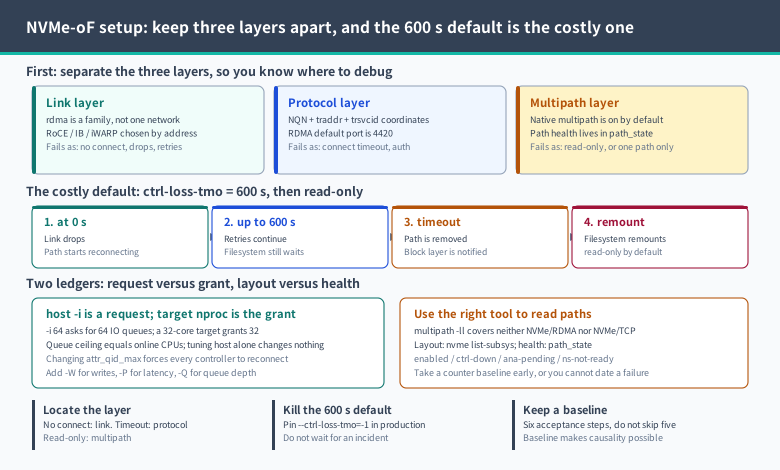
The man page defines --transport=rdma as "an rdma network (RoCE, iWARP, Infiniband, basic rdma, etc)". So -t rdma does not name one specific network: it names the whole RDMA family; whether RoCE or IB carries the traffic is decided by addresses and NICs, not by that flag. Keep this in mind, and you will not troubleshoot at the wrong layer later.
2. The addressing triple: NQN, traddr, trsvcid
Connecting to an NVMe-oF subsystem needs only three coordinates:
-n, --nqn: the subsystem name (NVMe Qualified Name), i.e. the subsystem created on the target;-a, --traddr: the controller address. The man page states that "for transports using IP addressing (e.g. rdma) this should be an IP-based address";-s, --trsvcid: the transport service ID. Quoting the man page: "for transports using IP addressing (e.g. rdma) this field is the port number. By default, the IP port number for the RDMA transport is 4420".
A fourth coordinate is easy to forget: the host's own identity. -q, --hostnqn sets it explicitly; when omitted, the resolution order is documented: /etc/nvme/hostnqn is read first, and if that does not exist the autogenerated NQN value from the NVMe Host kernel module is used.
Operational consequence: if the target enforces a host whitelist, and your host was reinstalled or the kernel module regenerated its NQN, you get "it worked yesterday, rejected today". Compare the hostnqn on both sides before blaming the network.
3. Host side: discover, then connect
The standard two steps:
# 1) discovery: what subsystems does the target expose?
nvme discover -t rdma -a 10.0.0.3 -s 4420

# 2) connect using the NQN from the discovery output
nvme connect -t rdma -a 10.0.0.3 -s 4420 -n nqn.2014-08.org.nvmexpress:uuid:xxxx
The connect flags that matter, gathered from the nvme-connect man page:
| Flag | Purpose | When you must touch it |
|---|---|---|
-t/--transport | transport type: loop, rdma, tcp, fc | determines which other flags are meaningful |
-n/--nqn | target subsystem NQN | always |
-a/--traddr, -s/--trsvcid | target address and port (default 4420 for RDMA) | non-default ports |
-w/--host-traddr, -f/--host-iface | source address and interface on the host | multi-NIC nodes picking the wrong egress |
-q/--hostnqn | host NQN | target whitelisting |
-i/--nr-io-queues | override the driver's default IO queue count | high-concurrency reads |
-W/--nr-write-queues | add queues used for write IO | write-heavy workloads |
-P/--nr-poll-queues | add polling queues for latency-sensitive IO | low latency, spare cores available |
-Q/--queue-size | override the number of elements in the IO queues | per-queue depth too shallow |
-l/--ctrl-loss-tmo | controller loss timeout, default 600 seconds | see the next section; almost always worth changing |
-k/--keep-alive-tmo, -c/--reconnect-delay | keep-alive period and reconnect delay | flapping links |
-g/--hdr-digest, -G/--data-digest | header and data checksums | links with silent-corruption risk |
4. The most expensive default: ctrl-loss-tmo=600
This is the number most likely to plant an incident in an otherwise correct deployment.
The SUSE storage guide states it plainly: after a path loss the NVMe subsystem keeps reconnecting for the duration given by ctrl-loss-tmo, which defaults to 600 seconds; once that expires, the path is removed and the block layer — that is, the filesystem — is notified, and the filesystem is then typically remounted read-only, which the documentation itself calls behaviour that "usually does not meet expectations". The recommended fix is to set the timeout to retry indefinitely:
nvme connect --ctrl-loss-tmo=-1Do the arithmetic: 600 seconds is ten minutes. One switch reboot, one flapping optic, one target that takes longer than ten minutes to come back, and your training job does not receive an IO error — it receives a filesystem that silently went read-only. In-flight checkpoint writes fail afterwards, and the error surfaces in the application layer, looking like a framework bug.
Diagnostic order: on "sudden read-only, process restart does not help, network has actually recovered", check whether the path still exists in nvme list-subsys, then look at ctrl-loss-tmo. That is why production connection settings should carry -1 from day one instead of being patched after an incident.
One more place worth knowing: the SUSE guide documents /etc/nvme/discovery.conf on the host, holding the arguments passed to discover (for example -t tcp -a 10.0.0.3 -s 4420, or -t rdma for RDMA), so boot-time discovery and connection happen from configuration rather than hand-typed commands.
5. Target side: a ten-step configfs export
Following the NVMe/RDMA chapter of the RHEL 10 storage guide, a node that already has a usable block device (for example a local NVMe drive) exports it in ten fixed steps:
modprobe nvmet-rdma
mkdir /sys/kernel/config/nvmet/subsystems/<nqn>
cd /sys/kernel/config/nvmet/subsystems/<nqn>
echo 1 > attr_allow_any_host            # test environments only
mkdir namespaces/10
cd namespaces/10
echo -n /dev/nvme0n1 > device_path      # backing block device
echo 1 > enable
mkdir /sys/kernel/config/nvmet/ports/1
cd /sys/kernel/config/nvmet/ports/1
echo -n 172.31.0.202 > addr_traddr      # local listening address
echo rdma > addr_trtype
echo 4420 > addr_trsvcid
echo ipv4 > addr_adrfam
ln -s /sys/kernel/config/nvmet/subsystems/<nqn> /sys/kernel/config/nvmet/ports/1/subsystems/<nqn>
The documentation also provides a verification: dmesg | grep "enabling port" should show a line such as nvmet_rdma: enabling port 1 (172.31.0.202:4420). That kernel line is the most direct proof of a successful export — faster than repeatedly retrying from the host.
Persistence: configfs is memory state and disappears on reboot, so the documented route is nvmetcli saveconfig nvme-target-backup.json to save and restore to recover. Archiving the JSON is not optional.
6. Three configfs attribute constraints that waste an afternoon if missed
The kernel ABI stable interface documentation spells out the semantics; three of them dictate operational order:
- Port attributes must be modified while the port is disabled.
addr_traddr,addr_trsvcid,addr_trtype,addr_adrfam,addr_tsas,param_max_queue_size,param_mdts,param_inline_data_sizeall require the port to be disabled first — change, then enable, never edit live. attr_qid_maxranges from 1 to 128, and changing it forces reconnection of all connected controllers. Adjusting the queue ceiling is a disconnect-level operation; do not do it during peak training.attr_allow_any_host=1conflicts with an explicit whitelist. It cannot be set to 1 while explicit hosts are linked inallowed_hosts/. Either open everything (test only) or admit each hostnqn individually.
Two attribute value domains are worth memorizing:
addr_adrfamacceptspcie,ipv4,ipv6,ib,fc,pci,loop— note thatibandipv4are different address families, so do not fill inipv4when using IB addresses.addr_tsasshows the QP type for RDMA:connectedordatagram; for TCP it isnoneortls1.3. QP type changes both multipath and reconnect behaviour, so confirm what the peer target implements before switching.
The defaults of param_max_queue_size, param_mdts, param_inline_data_size are all -1, meaning "let the transport choose". A -1 there is not an anomaly.
7. Queue counts are not arbitrary: the ceiling lives in the target's CPUs
This is the most common root cause of "high concurrency but half the bandwidth". Kernel documentation on the NVMe target states two constraints:
- the NVMe target core code limits the maximum number of IO queues to the number of online CPUs;
- the total number of queue pairs is further bounded by interrupt resources (MSI/MSI-X vectors) and similar hardware conditions.
The arithmetic follows directly: if the target node's nproc is 32, its IO queue ceiling is 32. A host asking for -i 64 will not receive 64 IO queues — the excess is either refused or degraded.
Practical order:
- Read
nprocon the target and treat it as the hard ceiling for the host's-i. - Allocate by workload shape: raise
-ifor read-heavy, add-Wfor write-heavy, add-Ponly when latency matters and cores are spare (polling queues consume CPU). - Raise per-queue depth with
-Qonly within what the target'sparam_max_queue_sizewill negotiate.
Put differently: the host's queue flags are a request; the target's CPU count and port parameters are the approval. When bandwidth disappoints, look at both sides — tuning only the host usually tunes nothing.
8. Multipath: on by default, and easy to inspect with the wrong tool
Two official documents reach the same conclusions:
- NVMe native multipathing is enabled by default; if the CMIC option is set in the controller identify data, the NVMe stack recognizes the drive as a multipathed device by default.
multipath -ll(DM multipath) is not supported with NVMe/RDMA or FC, and was never supported with NVMe/TCP; using it on NVMe devices requires enablingenable_foreign.- Native multipathing is disabled with the boot parameter
nvme-core.multipath=N.
The right command for the path layout is nvme list-subsys. And the right place to see which path broke is path_state in sysfs, with four documented values:
| path_state | Meaning |
|---|---|
enabled | the path is usable for IO |
ctrl-down | the controller is not live, so the path is disabled |
ana-pending | an ANA state change is pending |
ns-not-ready | the namespace is not ready |
Below that sit three diagnostic counters (with CONFIG_NVME_MULTIPATH enabled) — the only hard evidence of how much IO was actually affected:
/sys/block/nvmeXcYnZ/diag/multipath_failover_count: path failover count;/sys/block/nvmeXnY/diag/io_requeue_no_usable_path_count: IOs requeued because no usable path existed;/sys/block/nvmeXnY/diag/io_fail_no_available_path_count: IOs failed outright for lack of an available path.
If all three climb, the problem is in the path layer, not the application. If only the third climbs, failover itself is not keeping up.
The path selection policy (iopolicy) also shapes what you can observe: only under the documented numa and queue-depth policies do the numa_nodes and queue_depth sysfs files carry meaning (queue_depth returns empty when the policy is not queue-depth).
9. Link integrity: two digests and one address family
Three switches that are easy to skip and valuable when it counts:
-g/--hdr-digest: enable header checksums;-G/--data-digest: enable data checksums;addr_adrfam: confirm the address family matches the link (IP usesipv4/ipv6, IB addresses useib).
Digests cost CPU and bandwidth; what they buy is turning silent corruption from "the data is quietly wrong" into "the link reports an error and retransmits". For write paths such as checkpoints, where wrong data means wasted training, enabling them is the safer default; for scratch reads, evaluate first. Our data integrity article covers the storage-side end-to-end checking that closes the loop with this.
10. A six-step acceptance order — do not skip steps
After wiring up a node, work through this order and do not proceed past a failing step:
# 1) discovery: can the target's subsystems be seen?
nvme discover -t rdma -a <target_ip> -s 4420

# 2) connect: does a controller appear?
nvme connect -t rdma -a <target_ip> -s 4420 -n <nqn>
nvme list

# 3) multipath layout: path count and ANA state
nvme list-subsys

# 4) path health: the four path_state values
cat /sys/block/nvme*n*/path_state

# 5) export evidence on the target
dmesg | grep "enabling port"

# 6) counter baseline: sample once now, to judge "is it climbing" later
for f in /sys/block/nvme*/diag/*count; do echo "$f: $(cat $f 2>/dev/null)"; done
Step 6 is the one people skip, and it decides whether later analysis is causal at all: without a baseline you cannot tell a historical counter from a fresh one.
11. Six traps and one summary
| Symptom | Root cause | Action |
|---|---|---|
| Filesystem turns read-only after a link loss | ctrl-loss-tmo default of 600 s expired, path removed | set --ctrl-loss-tmo=-1 at connect time |
| Worked yesterday, rejected today | hostnqn changed (/etc/nvme/hostnqn gone, or reinstall) | compare both sides; pin with -q |
| Port attribute write fails | port not disabled before modification | disable, modify, re-enable |
| Training disconnects after a queue change | attr_qid_max change forces reconnect of all controllers | schedule it in a maintenance window |
| High concurrency reaches half the bandwidth | target IO queue ceiling equals online CPU count | keep host -i within target nproc, scale the target if needed |
multipath -ll shows no NVMe device | DM multipath does not support NVMe/RDMA or TCP | use nvme list-subsys plus path_state |
One sentence: the hard part of NVMe-oF is not connecting, it is the four things after connecting — moving ctrl-loss-tmo from ten minutes to infinite retry, sizing queues to the target's CPU count, judging the path layer with path_state and the three counters, and aligning digests and address family with the link. Do those four, and remote NVMe behaves like a local drive.
Related Articles
- GPUDirect Storage in practice: moving data from NVMe straight to GPU memory
- Training data storage selection: the division of labour between object storage, parallel file systems and local NVMe
- Data integrity in practice: end-to-end checks, scrub and silent corruption handling
Related Articles
- Object Storage Is Not a Disk: S3 Semantics, the Cost of Mounting, and Data-Lake Integration
- MDS in Practice: Metadata Bottlenecks, DNE Directory Sharding and the Recovery Window
- Lustre Client Tuning: Striping Layouts, Multi-NIC LNet and I/O Parameters
- Capacity and Quota Operations: Diagnosing inode Exhaustion, the Two Watermarks, and Growth Forecasting