Small Files and Packing in Practice: Directory Layout, Archive Formats and tar Flags
A very common scene: the dataset is ten million 20 KB images, or three million 4 KB annotation JSONs, copied straight into a parallel file system. df shows only 200 GB used and plenty of free space, yet training starts with GPU utilization bouncing around 30%, ls on one directory takes more than ten seconds, and a single rm -rf runs all night.
This is not "slow storage" — it is a mismatch between data shape and what the storage is good at. Parallel file systems are designed for large, sequential, concurrent I/O. Stuffing tens of millions of tiny files into one directory asks them to work in the way they are worst at.
This article answers three questions:
- On which three accounts does the cost of small files show up, and how do you measure them with tools you already have;
- How should directories be organized, when must you pack, and when should you not;
- Which format to pack into, which tar flags are mandatory, and how to verify the result.
Every conclusion about format limits, flag semantics and directory guidance comes from the GNU tar manual, the WebDataset format documentation and the official Lustre documentation. The quantification is a measurement recipe you can reproduce on your own cluster, not a guessed multiplier.
1. Where small files cost you: three layers, kept separate
Split "small files are slow" apart and you get three different things, with three different fixes.
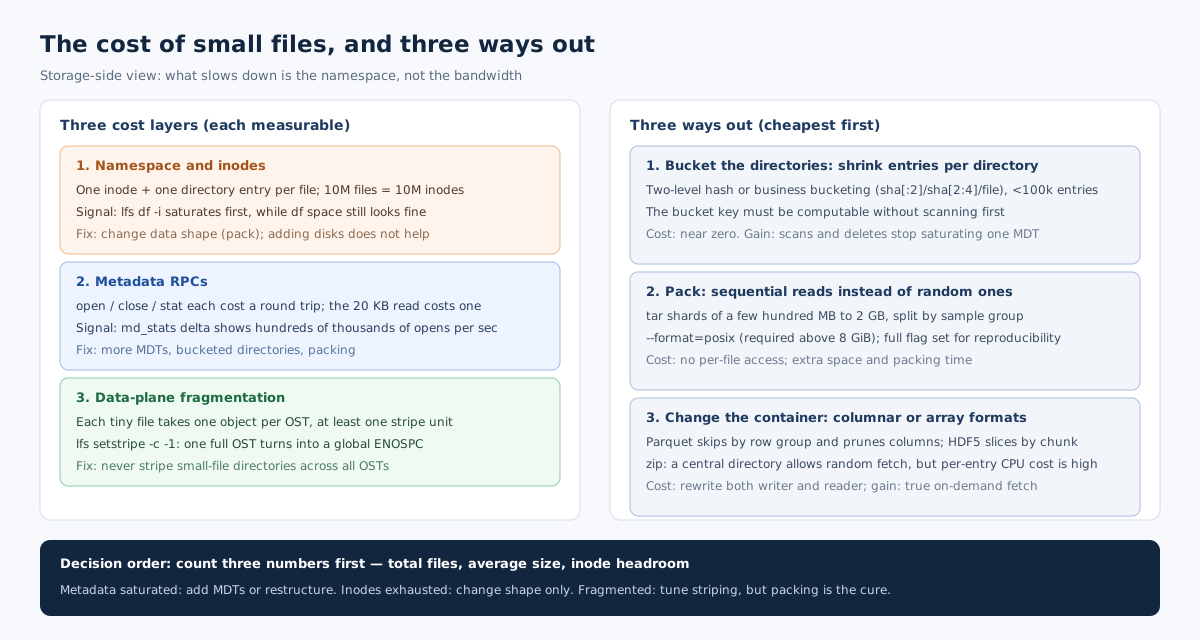
Layer one: namespace and inodes. Every file has an inode on the metadata service: type, permissions, owner, timestamps, size, and the mapping of "which objects on which OSTs hold its data". Ten million files means ten million inodes and ten million directory entries. How many inodes a metadata service can hold and how many metadata operations per second it can serve are two independent capacity limits — the former is space and memory, the latter is CPU and locking.
Layer two: metadata RPCs. One open() is one metadata request; close() may be another; stat() and unlink() each count. Reading a 20 KB file moves only 20 KB of data, but three metadata round trips may already have been spent before that. The smaller the file, the larger the metadata share of total latency. In the extreme, reading ten million files issues metadata operations on the order of ten million times more than reading a thousand 200 GB files — while transferring exactly the same number of bytes.
Layer three: data-plane fragmentation. A small file occupies one object on each OST it is striped to, and one object costs at least one stripe unit. If the directory is set to stripe across all OSTs (lfs setstripe -c -1), every 20 KB file takes a slice on every OST: space amplification plus doubled metadata entries. Lustre's official documentation lists this as a common mistake: once one OST fills, all new writes fail with ENOSPC even though the file system as a whole has plenty of free space, because when stripe_count equals the OST count the MDS cannot skip full OSTs.
The order of diagnosis matters: if layer two (metadata RPCs) is saturated, adding MDTs or restructuring directories helps; if layer one (inode exhaustion) is the issue, adding space does nothing and you must change the data shape; if layer three (fragmentation and amplification) is the issue, striping parameters help, but the cure is packing.
2. Measure three numbers before deciding to change anything
Changing shape has a cost — packing takes time, takes extra space, and destroys the convenience of "fetch any sample by file name" — so measure first.
Number one: total file count and average size.
# File count and total bytes (on huge directories find is steadier than ls; note it also walks the tree)
find /mnt/lustre/dataset -type f | wc -l
find /mnt/lustre/dataset -type f -printf '%s\n' | awk '{s+=$1} END {print NR, s/NR, s}'
The output is "file count, average bytes, total bytes". A rule of thumb: if the average is below 1 MB and the count is in the tens of millions, packing deserves a serious discussion; if the average is tens of MB or more, the benefit of packing is mainly "fewer files" rather than "higher single-stream bandwidth".
Number two: inode headroom. lfs df -i shows inode utilization, which warns you earlier than free space does. Space at 80% with inodes at 95% means the bottleneck is already on the namespace side.
Number three: the metadata operation share. Sample md_stats on the MDT twice and take the delta, then look at the share of open, close, getattr and statfs in the total. If open runs at hundreds of thousands per second while data throughput stays low, you have a metadata storm, not a bandwidth problem.
Only reading all three together tells you whether to touch directories, striping, or data shape. Staring at the free-space percentage of df will almost always mislead you.
3. How to organize directories: bucket, don't build one giant directory
Entries per directory is a second variable, independent of total file count. Lustre can technically manage hundreds of millions of entries per directory, but the official documentation is explicit: large directories can cause performance degradation or lock contention when high-concurrency metadata access or directory scans (ls -lR, rm -Rf) are required, and it recommends hierarchical structures with multiple directories rather than a single large directory to reduce contention for parallel workloads.
Turned into rules, that is three things:
- Keep entries per directory in the hundred-thousand range. Beyond that, a single
readdircannot return everything, scan-type operations slow down, and the delete storm ofrm -Rfcan saturate one MDT at once. - Use two levels of bucketing, not a flat layout. Derive subdirectory names from a content hash or a business dimension (dataset/version/date/shard number), taking the first two or four characters, e.g.
sha[:2]/sha[2:4]/file. That keeps both the number of directories and entries per directory bounded, and the bucket key stays independent of content distribution. - The bucket key must be computable, not discoverable by scanning. If bucketing needs file contents to decide placement, incremental ingest becomes impossible. Use a stable ID (hash of the sample ID or of the original path) so any process can compute the target directory on its own without an
lsfirst.
What not to do is equally concrete: do not run repeated parallel scans that include stat on huge directories (ls -l fetches attributes for every entry, so a hundred concurrent processes mean a hundred times the metadata requests); do not bucket by timestamp, because one import batch shares a timestamp and lands entirely in one bucket.
If a directory itself has become a hot spot, lfs setdirstripe -c N stripes it across several MDTs and improves parallel file access to that directory. The official documentation also notes that this may not help parallel directory scans — a scan typically has to fetch a portion from every involved MDT and merge, which can be slower. Striping a directory is a tool for access hot spots, not for faster scans.
4. To pack or not to pack: five criteria
Packing is not a panacea. It trades "random access to N files" for "sequential read of one container", and the price is losing direct per-file access (unless the format carries an index). Five criteria:
| Criterion | Leans toward packing | Leans toward not packing |
|---|---|---|
| Average file size | Below 1 MB, count in the tens of millions | Tens of MB or more per file |
| Access pattern | Batches read sequentially, samples random but the set is fixed | Fetch one sample by ID in place, frequent add/delete/modify |
| Update frequency | Versioned dataset, generated once, read-only afterwards | Daily incremental writes, reads while writing |
| Consumers | Frameworks pull by shard order, which they accept naturally | Depends on POSIX path semantics, external tools fetch by file name |
| Space and inodes | Inode headroom low, space amplification visible | Inodes plentiful, space is not a bottleneck |
Conversely, there are three cases where packing brings little or negative value:
- The files are already large. Packing a 500 MB checkpoint shard into a tar only adds a shell, plus one more unpacking step on read.
- In-place random writes are required. tar is an append-only streaming format; changing one sample means rewriting the whole archive. Such workloads belong in a container that supports random writes, or simply stay on the file system.
- Compression is not worth the CPU. Formats with high ratios (high zstd levels, say) saturate the CPU on decompress, easily moving the bottleneck from storage to CPU in a GPU training pipeline.
5. Choosing a format: a matrix, not just tar
| Format | Structure | Fetch one sample at random | Sequential read | Who it suits |
|---|---|---|---|---|
| tar shards | Several tar files, each a stream of a batch of samples | No (must scan in order to the target) | Best, purely sequential | Image/audio/text sample sets, frameworks that already read shards |
| WebDataset | tar plus two naming conventions | Locate by shard, sequential within a shard | Best | Deep learning training, multimodal grouped samples |
| Parquet | Columnar, row groups and a footer index | Yes (skip by row group) | Good | Structured/tabular features, column pruning |
| HDF5 | Hierarchical container, chunked datasets | Yes (index by chunk) | Good | Scientific arrays, slicing semantics |
| TFRecord / RecordIO | Append-only records, fixed or variable length | No, must scan sequentially | Good | Existing TensorFlow / MXNet ecosystems |
| zip | Central directory plus per-entry compression | Yes (read the central directory) | Fair (high decompress CPU) | Deliverables meant to be browsed like a folder, not training hot paths |
Three decision principles:
- On the training hot path, prefer a streaming format read sequentially (the tar family). The WebDataset documentation states it plainly: it uses tar as the container, files belonging to the same sample inside a tar share the same basename after stripping all filename extensions, and shards are numbered like
something-000000.tarthroughsomething-012345.tar, which allows purely sequential I/O pipelines — the official reason given is that sequential reads are 3x to 10x faster than random access, and this shape fits object stores naturally. - When you need row-group or column pruning, go columnar (Parquet). It turns "which columns to read" into an I/O question instead of a parsing one; the cost is that the writer must aggregate, and it does not suit write-while-training.
- When you need array slicing, use an HDF5-style container. But know that its concurrent write capability is weak: it is normally "write once, read many", not a staging area for many concurrent writers.
One separate note on zip: it can fetch at random because of the central directory, but every entry is compressed independently, so decompression is pure CPU cost, and many training frameworks do not support reading members directly. It is for people downloading, not for training.
6. Packing with tar: format limits and mandatory flags
tar looks full of flags, but only two groups really bite: format limits and reproducibility flags.
6.1 Format limits: 8 GiB and 255 bytes
The limits listed in the GNU tar manual that matter directly for dataset packing are these:
- v7: file names and symbolic links at most 100 bytes; a single file must be less than 8 GiB (2³³ bytes = 8,589,934,592 bytes); UIDs/GIDs must be less than 2²¹ (2,097,152).
- ustar (POSIX.1-1988): file names at most 255 bytes, but names longer than 100 bytes must be split at a directory separator into two parts, the first at most 155 bytes; symbolic links still limited to 100 bytes; a single file again less than 8 GiB; UIDs, GIDs, device major and minor numbers less than 2²¹.
- gnu: no practical limit on file name length, but timestamps are integers, so only one-second resolution; subsecond information is lost. UIDs/GIDs limited to 64 bits and device numbers to 63 bits.
- posix (POSIX.1-2001 and later): no practical limits on file size, timestamp range or resolution, file name length, or UID width; it is the most flexible and feature-rich format, and the manual states it will be the default format for future versions of GNU tar.
The practical conclusion: packing large files requires --format=posix or gnu, never ustar/v7, otherwise any member above 8 GiB fails; and if your paths routinely approach 255 bytes, ustar's "100+155 split" hits the boundary easily, so use posix directly.
Note that GNU tar's default format is decided at compile time (usually gnu), not fixed at runtime. So packing scripts should state --format=posix explicitly rather than rely on the default.
6.2 Reproducible: same data should produce the same byte stream
Dataset packing has a hard requirement: packing the same version twice must yield the same sha256. Otherwise downstream cannot use the checksum to tell whether "this data has been swapped", and incremental deduplication becomes impossible.
The GNU tar manual provides a set of flags for this, because two archives of identical content can still differ when modification dates differ, or when directory entries come in different order. The manual recommends running in the C locale with:
LC_ALL=C tar \
  --sort=name \
  --format=posix \
  --pax-option='exthdr.name=%d/PaxHeaders/%f' \
  --pax-option='delete=atime,delete=ctime' \
  --clamp-mtime --mtime="$SOURCE_EPOCH" \
  --numeric-owner --owner=0 --group=0 \
  --mode='go+u,go-w' \
  -cf - dataset/ | gzip --no-name -9 > dataset.tar.gz
Flag by flag:
--sort=name: removes differences in directory entry order (different file systems and differentreaddirorders produce different archives).--format=posix: avoids problems with large files and unusual timestamps, and enables--pax-option.--pax-option='delete=atime,delete=ctime': atime and ctime have nothing to do with content, so drop them.--clamp-mtime --mtime=...: clamps every file newer than the base time to the base time, instead of demanding exactly matching timestamps.--numeric-owner --owner=0 --group=0: removes UID/GID and user-name differences (a guaranteed trap when packing across clusters).--mode='go+u,go-w': keeps only the owner's permission bits, dropping group and other differences.gzip --no-name: the gzip header carries the original file name and timestamp by default;--no-name(-n) strips them, otherwise the compressed file differs every time.
One cost to know in advance: --sort=name reads the whole tree and sorts it, which costs extra memory and time on tens of millions of files. If the data is too large to sort, fall back to "fix the input order instead": feed members from a file list with tar -T list.txt --no-recursion, where the list is generated deterministically by a script, while still passing --mtime, --numeric-owner and the rest. Order becomes controllable without a full sort.
6.3 Sharding: never write one tar of several TB
A single tar has several practical ceilings: packing time, the cost of redoing it after a failure, and the fact that a consumer can only read one file sequentially. So datasets are normally split into shards. WebDataset's naming convention is something-000000.tar through something-012345.tar, and training uses brace expansion (something-{000000..012345}.tar) to obtain the full list.
A working rule for shard size: a few hundred MB to 1–2 GB per shard. Three reasons: below a hundred MB the shard count explodes and metadata overhead returns; above a few GB packing one shard takes long and a failure is expensive to redo; a few hundred MB also sits above the stripe width of a parallel file system, so a single stream can saturate it.
Split by "sample group", never by raw byte count: multimodal samples (image plus annotation) must land in the same shard with matching basenames, or the consumer pairs them incorrectly. That is exactly WebDataset's convention: within one tar, files that share a basename after stripping all extensions form one sample.
7. The real bottleneck in packing: serial traversal, not bandwidth
Packing is a metadata-intensive operation, not a bandwidth-intensive one. Even with hundreds of GB/s of aggregate bandwidth underneath, a single-process tar packing millions of small files is usually limited by two things: directory traversal (readdir) and per-file attribute fetch/open (stat + open). Both can only advance serially through one MDT's namespace.
So parallelize the input side, not the output side:
# Pack in parallel by first-level subdirectory: each process owns one subtree and produces its own shard
for d in $(ls -d dataset/*/ ); do
  name=$(basename "$d")
  tar --format=posix --numeric-owner --owner=0 --group=0 \
      --mtime="$SOURCE_EPOCH" -cf "shards/${name}.tar" "$d" &
done
wait
Key points:
- Set parallelism by the number of subdirectories, not by file count. Several processes reading the same directory concurrently only contend for the lock.
- Write the output somewhere else. Do not write back into the hot directory being read. Packed output is "a few large files", which is fine in the hot tier, but keep it separate from the source to avoid metadata churn on the same tree.
- Estimate space first: uncompressed size is total source bytes plus roughly 1 KB of header overhead per member (a 512-byte header plus long-name extension records plus 512-byte alignment padding). Ten million files means tens of GB of headers alone — do not size the target from data bytes only.
- Show progress:
--checkpoint=10000 --checkpoint-action=dotproves the job is advancing; otherwise a long run looks hung.
8. Extraction and verification: packing is only half the job
A packed artifact must be verifiable, or "the data was moved" is self-comfort. Three checks:
- File count and bytes:
tar -tvf shard.tar | wc -lmatchesfind | wc -lon the source; the sum of member sizes matches the source total bytes. - Manifest and hashes: generate a per-file
sha256manifest (sha256sumoutput) before packing and keep it with the same lifecycle as the data; compute an overallsha256of the archive after packing. The former pinpoints "which entry is broken", the latter proves "the package was not swapped". - Sampled extraction: pull a few samples out of every shard, decode them once, and confirm it is not the "opens fine but content is scrambled" case.
Parallel extraction mirrors packing: one process per shard; create the target directories first, then extract, so concurrent processes do not race to create the same level.
mkdir -p dataset/{000000..012345}
for s in shards/*.tar; do
  idx=$(basename "$s" .tar)
  tar -xf "$s" -C "dataset/$idx" &
done
wait
--strip-components=N drops a redundant prefix level inside the archive, which saves one metadata pass compared with extracting and then mv-ing everything.
9. When not to pack
The criteria were given above; here are four counterexamples, all seen in the field:
- Checkpoints: a checkpoint is "a few large files, atomically replaced, read directly by path from the training processes". Packing it into a tar adds a layer to a workload that is already large-file, for zero benefit. What it needs is sharding and asynchronous saving.
- Logs and experiment records being appended incrementally: append-and-read-anytime. tar's append-only semantics actually fit, but rewriting the whole package on every change is unacceptable. Such data should be "rolling small archives by time window", not one master package.
- Intermediate results that need POSIX semantics: processes exchanging files by name, atomic commit via
mv, coordination viaflock— none of that survives inside a tar. Packing suits final-state datasets only. - Cold data accessed rarely but kept for years: better placed directly in object storage or an archive tier. Packing is a convenience during the move, not something to keep a copy of in the hot tier.
10. A one-page checklist
- [ ] Count three numbers first: total files, average size, inode headroom; then decide whether to change directories or shape.
- [ ] Keep entries per directory in the hundred-thousand range; bucket in two levels by hash or business dimension, with a key any process can compute.
- [ ] Do not run parallel
ls -l-style scans over huge directories; delete in batches or bucket by bucket. - [ ] Never
lfs setstripe -c -1on small-file-heavy directories (striping across all OSTs turns one full OST into a globalENOSPC). - [ ] Check whether any single member exceeds 8 GiB before packing: if so,
--format=posixorgnuis mandatory. - [ ] State
--formatexplicitly in the packing script; do not rely on the compile-time default. - [ ] For reproducibility, use the full set:
--sort=name,--mtime,--numeric-owner --owner=0 --group=0,--mode,gzip --no-name. - [ ] Keep shards at a few hundred MB to 1–2 GB; split by sample group, not by bytes.
- [ ] Parallelize packing by subtree, not by file; keep output separate from source.
- [ ] Reserve header overhead (tens of GB for ten million files); do not size from data bytes alone.
- [ ] Verification three-pack: member count, byte total, per-file manifest plus whole-package hash.
- [ ] Keep the ability to fall back to the file layout; do not delete the source before packing succeeds.
11. Five traps
- Treating
dffree-space percentage as health. Small-file workloads usually exhaust inodes and metadata throughput first, with plenty of space left. - Writing one tar of several TB. Hours to pack, hours to redo after a failure, and a consumer that can only read it serially. Sharding is the first principle.
- Packing large files with ustar. Any member above 8 GiB fails outright, and the error often only says "file too large", which is easily mistaken for a disk problem.
- Packing across clusters without
--numeric-owner. UID/GID mappings differ, so after extraction every owner becomes a number or the wrong user, and permission debugging can eat a day. - Declaring success once the archive "opens". Without decoding and comparing member counts and byte totals, you find out at training time, as "corrupted sample", that the pack was truncated.
In one sentence: the small-file problem is not "slow storage", it is the wrong data shape; packing is not stuffing files into a box, it is trading random access for sequential access and tens of millions of metadata entries for a few dozen — and every link in the chain (format, flags, shards, verification) must be specified to spec.
Related Articles
- MDS in Practice: Metadata Bottlenecks, DNE Directory Sharding and the Recovery Window
- NVMe-oF in Practice: RDMA Transport, configfs Export and Native Multipath
- Data Integrity in Practice: End-to-End Checksums, Scrub, and Silent Corruption Response
- GPUDirect Storage in Practice: A Direct Data Path from NVMe into GPU Memory